
Design Articles
How to prepare for a business photo shoot
For many businesses, photography can be such an important part of putting your best foot forward. However, many people don't take proper considerations before taking their photos. Here are a few tips for how to prepare for a business photo shoot.
For many businesses, photography can be such an important part of putting your best foot forward. However, many people don't take proper considerations before taking their photos. Here are a few tips for how to prepare for a business photo shoot.
Professional photography makes a huge difference. I can't tell you how many times I've heard clients say "I have a nice camera, I can take my own photos." Unfortunately, what makes a great photo has very little to do with the equipment. What makes a fabulous photo is the consideration of composition, lighting, framing, angles and many other elements that take the skilled eye of an artist to capture.Although it is tempting to think you can do this step yourself, take a look at the comparison below to see the difference between a photo I took myself and one taken of the same subject by a professional photographer. The photo on the left was taken by myself with my high-res digital camera. The photo on the right was taken by local professional photographer, Wendy Martinez.
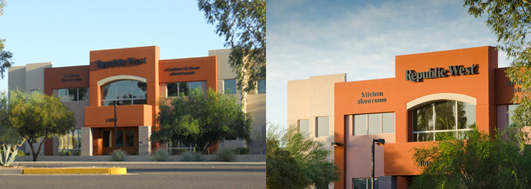
As a designer I have a good eye for layout, and you'd think I could take a decent photo, but when you compare my photo with a professional's photo, you can see how much more the professional photo captures the spirit of the subject and how it is technically much better in terms of composition, framing, lighting, etc.
“What makes a fabulous photo is the consideration of composition, lighting, framing, angles and many other elements that take the skilled eye of an artist to capture.”
Consider orientation
Although a photographer has the ability to take amazing photos, they can't possibly know where you intend to use them, so you'll want to have a discussion with them about the type of photos you need and where you intend to use them. When you are having this discussion, make sure you talk about whether you need your photos taken at vertical or horizontal orientation. You'll want to consider where you want to use your photos. For example, if you are looking to use your photos in the large main image area on your website, you'll definitely want to make sure you get lots of horizontal photos. However, if you are looking to use the images in more of a brochure-style context, vertical orientation might be what you need. If in doubt, make a point to ask the photographer to shoot each shot type at both orientations just to be safe.
Get close up—and far away
Likewise, you'll want to consider how closely zoomed the images should be. Lots of people—especially photographers—love zoomed-in photos because they are very artistic and intriguing. However, you need to consider how you'll be using the photos to know how close is appropriate. Let’s use the example again of a photo that would be showcased in a horizontal band on your website home page. This area isn't usually as tall as the images a photographer would take, which means you'd have to crop some of the image off the top and/or bottom of the image. If the image is zoomed in too far, the image could end up looking too abstract. It is important to consider issues like this and communicate them to your photographer before the photo shoot in order to get the most useful photos possible.
Make a list and check it twice
Although a professional photographer might be incredibly talented, they aren't a mind-reader. Make them a list of the different photos you need them to take. This is called a shot list. Doing this will help give the photographer good direction and will ensure that you get the images that you need for your marketing materials. Compiling a list helps you mentally catalog what photos you'll need and gives your photographer a roadmap of what images should be taken. If you forgo compiling a shot-list to guide your photographer, they may take that to mean that they should just take images of what they feel is interesting, which may produce disappointing results if these images are not the photos you need. A simple shot-list would look something like this:
Head-on view of the building front
3/4 view of the building front
Multiple angles of sign
Front desk with receptionist working
Front desk with receptionist posed and smiling
Candid action shots of your CEO working
Posed shot of your CEO at their desk
And so on...
Less is not more
If you know me at all, you know I'm a big fan of the adage, 'less is more.' However, when it comes to a photoshoot, less is not more. Make sure you plan an adequate amount of time for your photoshoot and request that the photographer takes lots of variations of the photos you need. You never know when an angle you never considered will be exactly what you need to make your business or product shine.
Keeping these items in mind will help make the most of your photoshoot and give you lots of flexibility for how you could use the images captured. If you're in need of a professional photographer and don't know who to call, feel free to reference this handy list of photographers I know and love.
What is the lifespan of a website?
Goodness knows websites have changed a lot site the first one launched back in the early 90s. The technology has grown immensely in the past 5 years, and even more rapidly in the most recent couple of years. Now more than ever, it is important to have a great website, as the web is most people's primary means to getting the information they need.
My site was designed several years ago, and now I'm wondering if I should have my site redesigned. What is the average lifespan of a website before it needs to be redone?
Goodness knows websites have changed a lot site the first one launched back in the early 90s. The technology has grown immensely in the past 5 years, and even more rapidly in the most recent couple of years. Now more than ever, it is important to have a great website, as the web is most people's primary means to getting the information they need.Back in the day, websites were created using a code structure called 'tables.' In the early 2000s, a new type of code structure emerged that used divs and CSS in place of the former tables. This era is often referred to as Web 2.0. Divs and CSS remain as the backbone of today's websites, but currently there are a host of additional types of technology, such as the WordPress CMS and Javascript that are used to make websites even more beautiful and useful to their owners.
But technology wasn't the only thing that changed.
Along with the advent of these new technologies, came new styles of design that weren't originally possible. A really basic example of this is standard site width. Back in the 90s, websites were no more than 800 pixels in width (and often narrower) because monitors where quite small and clunky browsers ate up a lot of screen real estate. Now, the current standard is 960 pixels in width, with a lot of websites bucking the standards and experimenting with sites even wider than that. These wider widths are made possible by the affordability of larger monitors.Another way times have changed is the increased amount of devices we access the websites from. It used to be that you sat down at your desktop computer to go online. Nowadays, you've got tons of options to choose from. Desktop and laptop monitors cover a range of sizes and then there are also the smaller sizes of tablets and mobile phones to consider. With all these screen sizes to consider, its no wonder that responsive web design has become widely adopted by modern browsers as a solution that enables the ability to adapt your site content to the device being used, and serve up a better user experience.
Now that you've got the background info, lets return to the question of how long a website should last.
The fact is that there is no set rule for how long a website should last. However, if you site is older than 5 years, there is a pretty high chance that it should be redesigned. If it is younger than that and was built really well from the beginning, you might be able to make it last a little bit longer by doing a bit of realignment, rather than a full redesign.However, you can only stretch a site so far before it just makes good sense to start fresh and rethink it given today's technology and user needs. When it comes to such a large piece of your marketing as your website, it is easy to fall into thinking that you've spend so much time and money on it, it must last a really long time. Unfortunately that just isn't the case.Design and technology are continuing to change at warp-speed, and it is more important than ever to offer your customers a great experience on your site. With the advent of everything being online, it has raised the bar for design excellence, and users make judgement calls about your product or service based on the experience of your website.If you haven't redesigned your site in the last 5 years, or if you created your site yourself when you were just starting out, you might want to determine where a redesign might fall into your marketing plan in the next year. And if you've recently redesigned your website, make sure to take time regularly to evaluate it, making sure the content stays up-to-date and that necessary course corrections are made. This will help to extend the longevity of the site.
What can I expect from my website redesign project?
Taking the step to hire someone to design your website—whether for the very first time or as part of a redesign—can be a pretty scary thing. It is typically a big step both trust-wise and finance-wise. For most businesses, their website is a very important part of marketing their business, so it is natural to be wary of turning to someone else to help with that task.
Several years ago I built my own site, and I'm thinking it is time for an upgrade. Can you tell me about what I can expect during my website redesign?

Taking the step to hire someone to design your website—whether for the very first time or as part of a redesign—can be a pretty scary thing. It is typically a big step both trust-wise and finance-wise. For most businesses, their website is a very important part of marketing their business, so it is natural to be wary of turning to someone else to help with that task. Likewise, your website could very well be one of the larger investments in your marketing arsenal, it makes sense that you will want to truly understand the process of building your site.The good news is that we follow a simple 5-step process, and understanding these steps will can help you feel more confident throughout this duration of the project.Here's how a typical website design or redesign breaks down:
Step 1a: Discovery
During this first step, we'll take some time to talk with you (either in person or via phone) about your website design so we can get on the same page with your goals for the site. We'll walk through what you're looking for in your site, what it needs to do for your clientele, what you like and what you dislike. By the end of this discussion, we'll have brainstormed all of the content needed on the site which will come together to form a map of the site and the pages that it will be made up of (often called a sitemap). The typical timeframe for Step 1 is a couple of days.
Step 1b: Content creation and collection
It is easy to forget about the copy for the site, but whether you're hiring a copywriter or writing the copy yourself before we proceed with the following steps, it is best for us to have a draft of the content for your site. That way, we can design the actual content that will be on the site, rather than guessing about the content.
Likewise, some websites require professional photography to be taken, so it is at this time that photoshoots should be arranged so that the delivery of the final photos don't delay the coding and subsequent launch of your site.
Step 2: Sketches
Once we know the pages and content that are necessary on your site, we'll take some time to sketch out each key page. These sketches are designed to act as a blueprint for the design of the site. The purpose of the sketches is not to provide details about the aesthetic design, but to determine the hierarchy of each page, and to facilitate conversation about which items should be given more or less attention. The typical timeframe for Step 2 is about 1 week, depending on the number of pages on your site.
Step 3: High-fidelity mockups
After we've worked through the sketches, it is time to start working on the actual design! If you don't have a strong visual brand in place, this step would start with the creation of a visual strategy. The visual strategy is a document where we collect a set of brand colors, typefaces, and graphic treatments that the site will be built upon. Doing this step before starting the page layouts helps to separate the discussion about the overall feel of your brand from the discussion about the actual function of the site page layouts.
Once we have a strategy for your visual look and feel in place, we'll start designing the individual pages of your site. We typically start with the most critical page of your site. For many businesses, this might be the home page, however, for others it may be a different page, such as a product page. When designing a site, the first page design sets the tone—and a lot of the page structure—for the rest of the site, so it makes the most sense to make those base decisions on the most critical page layout. We'll work through each of the key pages of the site, designing a detailed mockup of each page for your approval. The typical timeframe for Step 3 is about 2-4 weeks for an average brochure site, this could go longer if you have a site with many pages to be designed.
Step 4: Code and Testing
Once all of the high-fidelity mockups are completed, we'll prepare the files for coding and will provide them to our developer. Our developer will code the designs to be as accurate as possible and will build a test version of your site on their server. Since everything has been approved at this point, you won't see any proofs until all of the pages are coded. Once the pages are coded, we'll give you access to the test website where you can review the site and confirm that everything looks correct and is functioning properly. At the same time, we'll be testing the site as well to make sure everything is correct before we launch the site. The typical timeframe for Step 4 is about 2-6 weeks, depending on the size and complexity of the site.
Step 5: Launch
While physically launching the site only takes a short amount of time, there may be several days after the launch where we're still fixing glitches or bugs that might not have been apparent during the site testing. You can also expect it to take several days for Google to re-crawl your site, so you may notice some results on Google that don't fully match up with the new site. After a few days, Google should re-crawl your site and things will naturally sort themselves out.From start to finish, the total timeframe for a website design or redesign project typically takes about 2-3 months, depending on the size and complexity of the site and the speed of the revision process.
In addition to these steps, there are a handful of other things to keep in mind throughout this process. Understanding these items will keep the process moving smoothly and help you set healthy expectations for the finished product.
Function is more important than perfection
It is important to remember that websites are editable and don’t necessarily have to be perfect to launch. I know this sounds strange, but a website is a living, breathing thing. Even if you think it is perfect upon launch, it will probably only be a few weeks or months before you want to update or improve something about the site. The great news is that unlike paper, websites are super easy to edit if you change your mind on something later. So don’t get too stuck in ‘perfect’ mode. Spending too much time obsessing and delaying your site launch might mean a lot of missed exposure for your site and your business.
The site won’t look exactly the same in each browser
Although your site should function and look presentable in each browser, it is natural that the site might look a little different in different browsers. Each browser has support for different capabilities, so we keep this in mind while designing your site, and will make use of what we can in each browser. It is important to remember that these slight variations probably won’t phase your visitors in the least since most users choose one browser and stick with it. They'll never know anything different from the version they see!
What are some books to help me improve my business?
Around the Strong Design studio, reading is one of our favorite past-times. I always am surprised by the new things I've learned by the time I've completed a new book. Often I've gleaned all sorts of tidbits that might not even relate to the true thesis of the book—tips on process, procedure, culture or the way people think. Here are a half-dozen of my favorite business books, and a quick synopsis of what I learned from them.
I currently run a small business, and lately I've been looking for ways to stretch, grow and make it better. Can you recommend some books to improve business?
Around the Strong Design studio, reading is one of our favorite past-times. I always am surprised by the new things I've learned by the time I've completely a new book. Often I've gleaned all sorts of tidbits that might not even relate to the true thesis of the book—tips on process, procedure, culture or the way people think. This just goes to show how you can learn a new business lesson in the strangest of places. Here are a half-dozen of my favorite business books, and a quick synopsis of what I learned from them:

Get Lucky by Lane Becker and Thor Muller
This is a brand-new book that looks into the idea of serendipity and its role in business. It carefully hits home the message that most of what businesses attribute to "luck" is often a long time of preparation that led them to be able to capitalize on a chance opportunity.
Setting the Table by Danny Meyer
At first glance, this book looks like book about Danny Meyer's path to becoming a restauranteur—and it is. But it is also a manual full of real-world examples of how to provide world-class hospitality. It doesn't take much additional imagination to start to see how one could apply the principles to their business to really spoil their customers and capture their hearts.
Delivering Happiness by Tony Hsieh
This book is an incredibly quick and easy read as Tony Hsieh, the CEO of Zappos, chronicles the thought process that has driven him to build an entire brand upon service to their customers. The book is a perfect example of how having a higher purpose behind simply peddling your wares leads to loyal fans and paves the way financial success.
The Millionaire Next Door by Tom Stanley
This might seem like a strange addition to this list, but hear me out a little. This book chronicles the true life of a millionaire in the United States—not the ones reality TV likes to push down our throats. It illustrates with dozens and dozens of stats, facts and tables that hard work, planning, wisdom and frugality are the building blocks of a strong financial house, and always serves as a reminder to me of how to approach not only my personal finances but also my business finances. After all, you can have the best business in the world, but if you can't pay the bills to keep the doors open, what good will that be?
Rework by Jason Fried
This is another weirdo on the list, but I've added it for a reason. By nature, I'm a "doer" and I've always struggled with that fact. However, this book helped me understand how much of an asset that is to running a business. The whole premise of the book is that nothing will ever be perfect, because perfection is unattainable, and that what matters is doing the best with what you have and getting the product "shipped" out to customers so you can afford to continue to refine it.
Crush It by Gary Vaynerchuck
This book claims itself to be a "how-to manual for turning your passion into a business." Although Gary V gives plenty of insight into that topic, the lessons I honed in on in this book were about how important it is as a business owner to have a strong personal brand to help fuel your business.
Anything by Malcolm Gladwell
So I said I'd outline six books for your reading pleasure, but I couldn't resist adding this last recommendation. If you haven't read anything by him yet, Malcolm Gladwell is an absolute genius when it comes to presenting research and conclusions on why people behave as they do. If the dots aren't instantly connecting for you, people are the core of any business—people in the customer role, the staff role or even the vendor role—and gaining the understanding to get a glimpse inside of their heads is absolutely invaluable to your success in working with them, serving them and delighting them. My favorite books by Gladwell are Blink, which investigates the split-second subconscious thoughts that often drive our decision process, and Outliers, which chronicles how "overnight success" stories are often not so much overnight, but typically the product of thousands and thousands of hours of committed devotion to one's craft.So that's it! Over a half dozen books for your reading pleasure and fuel for business' success. Go pick one up or check one out from the library and see what lessons you can extract from it. Happy reading!
The 21-Day Drawing Challenge
A little over a week ago, I attended the HOW Live Design Conference, and attended a session by Von Glitschka entitled "Drawing Conclusions: How Drawing Improves Design." At the end of that session, Von challenged each of us to a 21-day drawing challenge.
A little over a week ago, I attended the HOW Live Design Conference, and attended a session by Von Glitschka entitled "Drawing Conclusions: How Drawing Improves Design." At the end of that session, Von challenged each of us to a 21-day drawing challenge.
In the past couple of years have become obsessed with hand-drawn type. I'm not sure if it's my impatience with learning something new, need for perfection, or the intimidation of a blank page, but I haven't been able to wrap my head around drawing type myself. When Von made that challenge, I began to wonder if maybe this scenario was a good opportunity to start drawing more type. I decided that 21 days was a pretty short period of time, and I should just give it a shot.
The parameters I set for myself were as follows:
The drawing should take no more than 10 or 15 minutes, tops.
I'll work in a tiny sketchbook to minimize any "fear of the blank page."
The goal is to be rough. Perfect is intentionally not part of the plan.
No pen, and as little eraser as possible.
Week 1
So far I'm having a good time with this little project. I've been drawing various phrases or lyrics that have meaning for me that day. Here's a peek at the first five days.

Week 2
The challenge got a little tougher this week. It seems like the initial excitement of this project wore off this week, and I'm left with only my commitment to fuel me. The ideas weren't flowing as freely and I really had to work to push through. The good news is that by the end of the week I felt like my ideas were getting stronger, and I feel like I'm beginning to improve at envisioning how the words and letterforms balance one another and interlock. Additionally, I've realized that the concepts I feel are strongest are the ones where I have a personal stake in the message. It seems I might be more driven by illustrating a positive message than a perfect letterform.

Week 3
This final week's drawings remained challenging—my struggles from last week must have spilled into this week. Although I diligently practiced my drawings each day, I'm not overly thrilled with any of them, but I intend to keep keepin' on.Normally I'd say something like "I hope you like them!" at this point in the post, but honestly that's not what this experiment is about. Whether anyone likes them or not doesn't matter. This challenge is about drawing regularly, no matter the outcome, and hopefully improving in the process.


Think we might be a good fit for you?
Let’s talk about how we can design your future.