
Design Articles
Trending: Logo systems
Whether you're just starting your business, or you've been in business for years, you understand the importance of your logo. As we'd explained before, a great logo design serves as an identifier for your company—a visual shortcut—and sets the proper tone for what it is like to work with your business. But what if your logo was more of a set of elements, rather than one single item?
Whether you're just starting your business, or you've been in business for years, you understand the importance of your logo. As we'd explained before, a great logo design serves as an identifier for your company—a visual shortcut—and sets the proper tone for what it is like to work with your business.
But what if your logo was more of a set of elements, rather than one single item? That's exactly what a lot of businesses are turning to in place of a single logo.
So what exactly is a logo system?
A logo system is exactly what it sounds like—a system of elements that make up the logo identifier for your company. It typically still includes a base logo form with several variations upon it, so as to create a much more dynamic effect that means the logo has the ability to change as needed across applications. Typically one element of the logo stays the same—usually the shape or the color palette—while another element is specifically designed to change within set parameters. It almost makes the logo system come alive.
When is a logo system a good idea?
A logo system could potentially be used in an logo design, however, if your brand has several arms or related product lines it could be an especially good fit. Before you consider choosing a logo system, it is also a good idea to consider how you intend to execute the brand collateral. If you had intended to do so in-house, it might be tougher to execute the strategy well, than if you intend to maintain a long-term relationship with your designer. Executing a logo system is slightly more complex and usually requires a professionally-trained design eye to make the best use of the system.
What are some recommendations for creating my own logo?
Sometimes, as much as you value the idea of having a professional logo designed, it just isn't in your budget yet. Never fear, here's a few tips you can take to develop your own logo design that can hold you over until you're ready to have a professional logo designed.
I just started my own business, and I need a logo design however, I can't afford a professional design yet. Do you have any tips for creating something that can get me started?
Sometimes, as much as you value the idea of having a professional logo designed, it just isn't in your budget yet. Never fear, here's a few tips you can take to develop your own logo design that can hold you over until you're ready to have a professional logo designed.
Stick to type treatments
Developing a great icon or a mark is a challenge for even the most seasoned designer, and is probably a task you don't want to take on. It is tempting to fire up Microsoft Word, locate a clipart image and call it your logo, but the problem with this is that any one of your competitors can do the exact same thing. Not to mention that clipart typically looks like, well, clipart. It doesn't look custom, it doesn't communicate any emotion and it isn't very ownable at all. Instead, stick to a simple type treatment. Here are a few tips to creating a nice type logo to help you get by.
Don't use a font that came with your computer
Remember how we warned about looking to Word's clipart gallery for an icon or mark? The same thing goes for fonts. Stay away from any fonts that come standard with your computer. The problem with this is that these fonts are much too commonplace to act as the visual hook to your business. Instead, search out something more unique by using one of many online font websites. Fontsquirrel.com is my favorite site for free fonts, and myfonts.com is my favorite for fonts you can purchase. Both of these sites have hundreds, if not thousands, of fonts to choose from, and if you go with a purchased font, the likelihood that someone else might choose it for their logo is reduced.
Consider the feeling the font creates
Right now you're probably wondering how in the world you're going to pick a font from all of the options available to you. Before you start your search, write down 2-4 feelings that the typeface should evoke. That way, as you are searching for typefaces, you can cross-check the look of the typeface with your list to determine wether it feels the way you want it to feel.Here's a quick reference guide below that explains the general feelings associated with common types of fonts:

Err on the side of simplicity
Once you've started searching for fonts, and have a few possibilities, we'd urge you to err on the side of simplicity. So basically, if you are trying to choose between two fonts and one is more elaborate and the other is slightly less ornate, it would probably be in your best interest to choose the simpler option. The benefit of choosing a simpler option is that a simple solution will create a more sophisticated look in the short term, and will also give you the ability to transition to a custom logo in the future.
What are some inexpensive, do-it-myself website options?
Although web design has become quite affordable, the cost can still be too much for a brand-new business. Thankfully, there are a lot of options available to create a great starter websites that can hold you over until you can afford to make an upgrade.
I just started a new business, and as much as I'd really like to have a professional website designed for it, I just don't have the budget yet. Do you have any tips to create your own website?
Although web design has become quite affordable, the cost can still be too much for a brand-new business. Thankfully, there are a lot of options available to create a great starter websites that can hold you over until you can afford to make an upgrade. Although I haven't used many of these do-it-yourself website platforms, I did a little research into some options—and tapped the minds of many of my friends and colleagues—and have outlined some solutions and suggestions.
SquareSpace
SquareSpace describes themselves as "a fully hosted, completely managed environment for creating and maintaining a beautiful website, blog, or portfolio." From doing a little digging around, they seem to offer some standard layout options, and pricing starts at about $12 per month. Learn more at squarespace.com
WordPress
More often than not, if you hire a design firm to create your site, they will probably use WordPress as the engine that drives the site, and then create a completely custom design theme that perfectly accommodates your content. You can take the first step yourself and create your own WordPress site, using a stock theme. Unless you know a pretty hefty amount of HTML, CSS and PHP you probably won't be able to customize the site to the point a web design shop would be able to, but WordPress has a lot of cool themes and plugins that could get you off on a good foot. The only downside of WordPress is that, as a novice, there are so many options (in terms of themes, plugins, etc.) that it can get a little overwhelming, so it is wise to keep it simple. WordPress offers many themes for free, which means you would simply need to purchase your own hosting (which typically runs around $10 per month) for the site. If you choose to go this route, you may with to contact your hosting provider for help installing the WordPress software on your hosting. Learn more at wordpress.org
Virb
As they put it, Virb allows you to "choose a theme, add your content, customize and launch!" They seem to offer a lot of theme options, and pricing starts at about $10 per month. Learn more at virb.com
Wix
Wix positions themselves as a very easy-to-use platform, explaining their services as "Drag & drop. No programming. Search engine friendly." They do offer a free plan, but to get the site to direct to your own domain name (which is advised in order to appear the most legitimate and professional) you would need to upgrade your plan to one of their packages that start as low as $5 per month. Learn more at wix.com
Shopify
If you need an ecommerce site, Shopify seems to be a popular way to go. Their feature set claims "easy-to-use online store builder, fully customizable store design, secure shopping cart provided, and ecommerce hosting included." Their plans are a little more expensive (as ecommerce solutions always are) and start at $29 per month. Learn more at shopify.com
Other things to consider
Once you've selected the option that feels right for your needs, there are a few items you'll want to consider when putting the site together. Taking these items into consideration will help your do-it-yourself site look as polished and professional as possible.
Think simple
With most any site option you select, you'll be able to select some sort of base design template. You'll probably have dozens of options to choose from, which will feel really, really exciting. It will be tempting to select something wild and flashy, just because you can. However, flashy templates can look a little cheesy, unprofessional, and often give themselves away as being a stock template design. Instead, select something clean and simple. You just can't go wrong with a simple design. A clean, straightforward design will blend with almost any image you wish to portray, and is likely to be taken more seriously by your customers. This recommendation also goes for your font and color selections. You don't need a bunch of fonts and dozens of colors—one or two fonts and two to three colors will do just fine. Just make sure to make selections that blend with the other fonts and colors you are using across your visual design (logo, business cards, tags, etc.) so that your business doesn't look like it has a split personality.
Consider readability
Likewise, when you are selecting your template, fonts and colors, always be checking for readability. Make sure your background colors and images don't make your text hard to read, and make sure you select colors that contrast enough that they don't blend together, or create an optical illusion. When in doubt, make sure your text is placed over a solid color that is much darker or lighter than the text color so that it is readable.
Edit, edit, edit
With setting up your own website comes the challenge of writing your own content. More often than not, people think there is no such thing as too much information. This is not the case. Most people don't want to read any more than they absolutely have to. When using a do-it-yourself site, you'll be given large areas you can fill with copy, not to mention endless amounts of pages for no additional fee. Be careful not the be charmed by these open parameters, and be sure to curate your content carefully. Don't drone on—saying the same thing over and over again—and be careful not to add more pages than are really necessary to your site. Constantly ask yourself whether you customer really wants and needs this information, or whether you're just adding it because you can.
Trending: Responsive web design
By now, you've probably heard about how mobile device usage has skyrocketed in the past couple years. With this insane growth, comes a lot more people browsing websites on the web. When most people think of the mobile web experience, they think of people frantically looking up addresses and store hours on their iPhones at stoplights. However, that's not always the case.
By now, you've probably heard about how mobile device usage has skyrocketed in the past couple years. With this insane growth, comes a lot more people browsing websites on the web. When most people think of the mobile web experience, they think of people frantically looking up addresses and store hours on their iPhones at stoplights. However, that's not always the case.
As phones get getting quicker and more convenient, people are actually using them more and more in place of their regular computers. If you think about it, I bet you can remember a time in the not-so-distant past when you grabbed your phone to quickly look something up online, rather than taking the time to walk over to your computer.
The current mobile experience
Up until recently, if you wanted to give your users a mobile experience, you had to build a separate mobile site. Not only can building and maintaining a separate mobile site be expensive and tough to maintain, it can also be an awkward experience, as the site is often structured differently than the "full" desktop version of the site. As mobile usage increases, people are beginning to expect richer website experiences on their mobile phones. Having to pinch and zoom sites just doesn't produce a smooth browsing experience. If we want people to take time interacting with our sites, we've gotta find a way to give them a better mobile experience.So what if you could have one site that serves up both desktop, mobile, and even tablet-optimized experiences?Now you can. Enter responsive web design.
A new and improved mobile experience
Responsive design is a relatively new type of website design that is gaining a lot of steam, and becoming very popular. In a responsive design the site layout (and even content) is designed to change based on the size of the device it is being viewed on. A responsive website uses the same code for both mobile and desktop experiences, but includes additional styling that detects browser window sizes and alters the display accordingly. In fact, you can give it a try right now by resizing our site and checking out how the content layout changes as the browser window gets smaller.Responsive design isn't the answer for every site, but for a basic informational site, it can be a great way to go. It usually costs a little extra, since there is additional design, code, styling and testing to get it right. However, a responsive site is still significantly more cost efficient than creating and maintaining two separate sites.
what does a responsive site look like?
If you want to see a responsive site in action, just resize the browser on our site! If you want to view even more responsive sites, you can check out Mediaqueri.es, a gallery showcasing dozens and dozens of responsive sites.
Trending: Simpler websites
If you haven't yet noticed this trend, keep an eye out—websites are starting to cut the fat and get much simpler. People are becoming more an more harried, and simply don't have time to wade through dozens of menu options, or pages chocked full of lengthy copy.
If you haven't yet noticed this trend, keep an eye out—websites are starting to cut the fat and get much simpler. People are becoming more an more harried, and simply don't have time to wade through dozens of menu options, or pages chocked full of lengthy copy.
Users are in a hurry and don't want excess information imposed on them—they just want to access the info they need, quickly and easily. In addition to users' increasingly busy lives, there are a few other things driving this change.
Social media diffuses dependence on your website
Don't get us wrong, it is still important to have a website in order to provide a consistent, branded experience for your prospects to learn about you. However, with the rise of Facebook, Twitter, Yelp, etc. over the past years, there are a lot more ways for customers and prospects to learn about and interact with your organization. Because social media has made it so easy to get in direct contact with organizations quickly, there is not as much need to provide an over-abundance of information on your website.
Users are in a hurry and don't want excess information imposed on them—they just want to access the info they need, quickly and easily.
Mobile browsing demands refined content
There is a growing movement called "mobile first" that urges web designers and developers to use the brief, often urgent tendencies mobile web users have as a litmus test for site content. Simply put, they focus on refining site content to the most basic items needed by mobile users before choosing to add additional content. With the recent surge in responsive web design, it is now possible to create one website that works perfectly in a desktop browser and also a mobile browser. However, with this comes a need to refine content so that it is brief and to the point. Increased mobile browsing is propelling the trend of simpler websites forward, as there is simply no room for fluff when you consider mobile users' needs.
So how are organizations simplifying their sites?
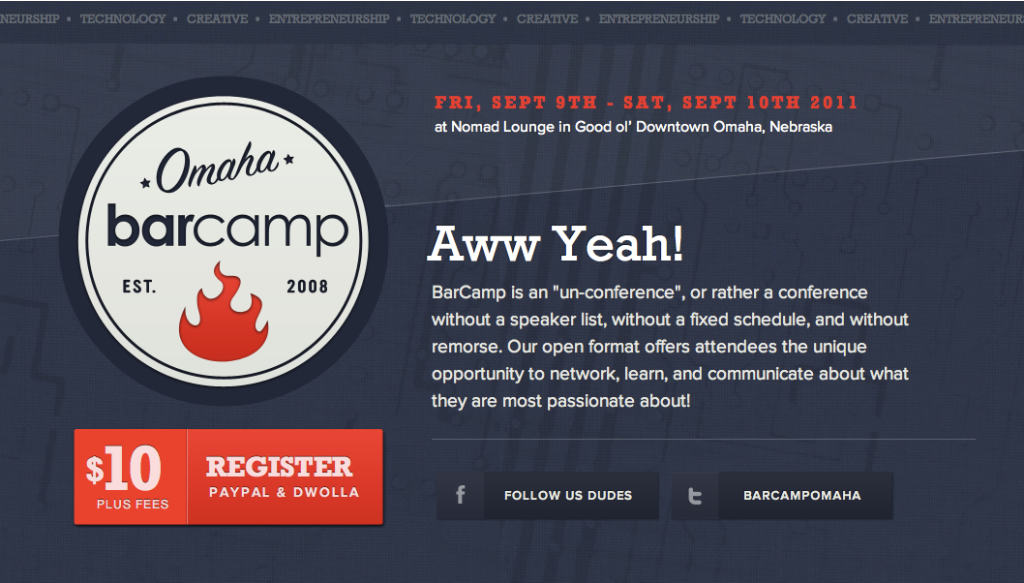
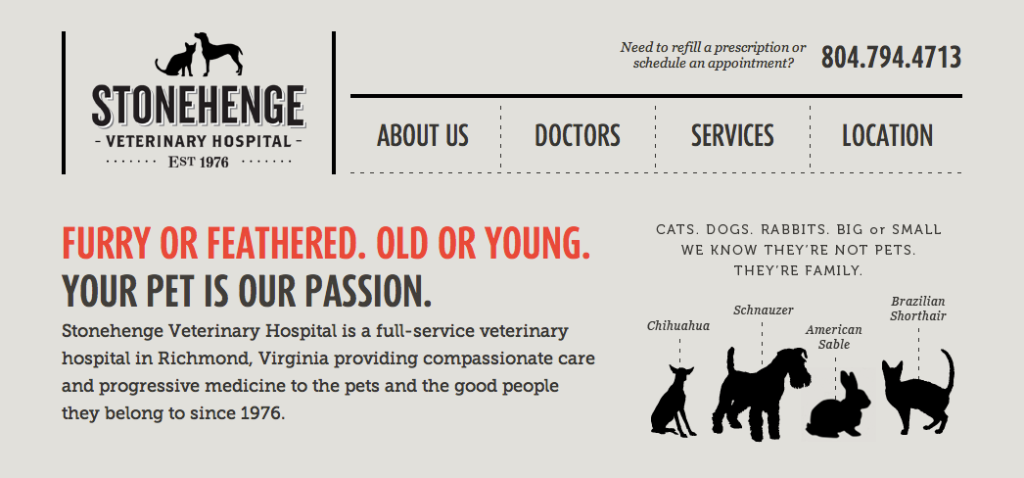
There are a lot of ways to simplify your site, and different steps are appropriate for different organizations. The best way to simplify your site is to revisit the content it currently holds and really consider if it is all completely necessary, or if it can be cut. This not a time to coddle pet projects, this is a time to be ruthless. Put yourself in your user's shoes—does your user really need to real full-page bios about all of your staff, or would a paragraph do? Is your about page really offering value to your users, or could the most compelling pieces be merged with other content? Sites are also getting simpler in their physical format. People are choosing single-page sites over multi-page sites, drastically reducing menu options, ditching their drop-down navigation, using shorter bits of copy paired with meaningful graphics and many other techniques to help their users get to the point quicker.
A few examples from around the web


Think we might be a good fit for you?
Let’s talk about how we can design your future.